

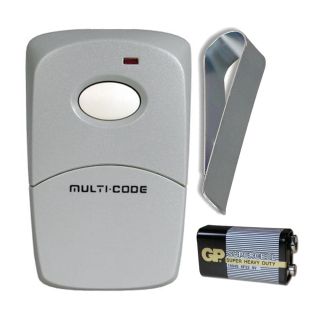
Firefly 300MCD21K Linear Multi-Code Compatible Remote

Rating:
100% of 100
In stock
SKU
300MCD21K

Quick Overview

    • Compatible with Linear Multi-Code 300 MHz remotes and receivers
    • Commonly used in parking garages, gated communities and garage door openers with an external receiver
    • Includes: Single button remote, Key chain, 12V battery and Instructions 
    • Dimensions: 1 7/8" X 1 1/2" X 1/2"


$13.35
  • Buy 5 for $12.95 each and save 3%
  • Buy 25 for $12.55 each and save 6%
  • Buy 50 for $12.15 each and save 9%
  • Buy 100 for $11.75 each and save 12%

Secured and trusted checkout with

The Firefly 300MCD21K is a single-button keychain transmitter engineered to work with Linear Multi-Code fixed-code radio systems operating at 300 MHz. Designed as a direct replacement or spare for Multi-Code 300 MHz receivers commonly found on gate operators and garage door openers, it provides simple, reliable access control for residential or light commercial applications. This compact remote is Multi-Code compatible and uses classic fixed-code technology, making it a practical upgrade for legacy installations that still rely on DIP-switch coding.

Programming is straightforward: open the remote and match its 10-position DIP switch pattern to the corresponding switch settings in your Multi-Code 300 MHz receiver. No software or special tools are required. Because it uses the Multi-Code 300 MHz format, the Firefly 300MCD21K is not compatible with rolling-code systems or other Linear formats such as MegaCode (318 MHz) or Security+ style transmitters. Use it to replace lost remotes, add additional users, or extend the convenience of your existing Linear Multi-Code setup with a durable, pocket-friendly key fob design.

5
Rating:
100% of 100
Write Your Own Review
You're reviewing:Firefly 300MCD21K Linear Multi-Code Compatible Remote
Your Rating
Customer Questions
No Questions
Did you find what you were looking for?

 How to Program a Firefly 300MCD21K Multi-Code Remote

1.  Remove the screw from the back of the remote.  Push the sides of the remote together long ways.  This will create a gap in the remote to put your fingernail in to push the remote apart.

2.  Locate the 10 switch code on the receiver or a working remote.  Your garage or gate will have an external receiver that will have the 10 switch code in it.  If you have a working remote it is usually easier to use the switches from the remote.

3.  Move the switches in the new remote so they are in the same order as the receiver or working remote.

4.  Press the remote.  The garage or gate should operate.  If the remote does not work then reverse all the switches.


To download the manufacturers instructions click here.

Multi-Code Compatible Radio Control List

This list covers all major brands that offer remotes, keypads, and receivers compatible with the 300MHz Multi-Code system.

1. Multi-Code Compatible Remotes (300 MHz)
BrandModel(s)StyleReplaces
Linear / Multi-Code3089 / 3060 / 3070Visor / KeychainOriginal Units
Digi-CodeDC-5010 / DC-5040Visor / Mini3089 / 3060
LiftMaster300MC1-Button Visor3089 / MCS308911
Keystone HeddolfM219-1K / M220-1KKeychain / Visor3060 / 3089
Transmitter SolutionsStinger / Firefly 300MCDCompact Visor / KeychainAll 10-Switch 300MHz
SkyLinkSD-300 / 100AKeychain / Visor3089 / 3060
ChallengerMC1010 / MC1020 / MC4210Standard VisorMulti-Code Format
2. Compatible Wireless Keypads
BrandModelFrequencyCompatibility
Multi-Code4200 / 420001300 MHz10-Dip Switch Receivers
Digi-CodeDC-5200300 MHzMulti-Code 1090 / 1099
Transmitter SolutionsDOLKPW300300 MHzStandard Multi-Code
Chamberlain / LMKLIK2U / 387LMUniversalMust set to Multi-Code mode
3. Multi-Code Compatible Receivers
BrandModelPowerNotes
Multi-Code1090 / 1099 / 302812V-24V / 24V Plug-inIndustry standard
Digi-CodeDC-5100 / DC-511012V-24V / 24VDirect replacement for 1090
Transmitter SolutionsTransceiver 30012V-24VHigh sensitivity/range
Technical Tip: Universal Remotes

Models like the Chamberlain KLIK3U or LiftMaster 380UT can work with Multi-Code, but they do not have physical dip switches. You must use a "Step-and-Set" programming method to simulate the 10-switch code.