
Multi-Code 3089 Remote Gate or Garage Door Opener by Linear

Rating:
97% of 100
In stock
SKU
3089

Quick Overview

  • Compatible with 300 MHz Multi-Code, 10 switch remotes and receivers
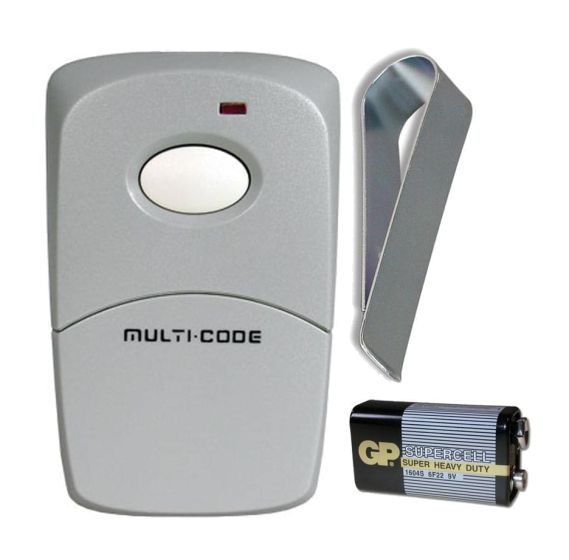
  • Includes: Single button remote, Visor clip, 9V battery and Instructions 
  • Dimensions: 3" X 1 3/4" X 9/16" 
  • Genuine Linear remote
$22.85
  • Buy 10 for $22.16 each and save 3%
  • Buy 25 for $21.48 each and save 6%
  • Buy 50 for $20.57 each and save 10%

Secured and trusted checkout with

The Linear Multi-Code 3089 is a single button remote used to operate a garage door opener or gate. The Multi-Code 3089 uses 10 binary (two position) switches giving you 1024 coding options.  This remote uses 300 MHz Multi-Code format.

Compatible with Linear Multi-Code 300 MHz receivers.

Includes:
Single button remote
Visor clip
9V battery
Instructions

Dimensions: 3" X 1 3/4" X 9/16"

Specifications:
Model: 308911
Order Number: MCS308911

UPC: 093863118562
FCC ID: EF4 XMULTI-CODE
Canada RSS/CNR210: 1078 102 1578


The Linear Multi-Code 3089 will work if you use any of the following radio controls:

Chamberlain: 300MC

Keystone Heddolf: M220

Linear: 109020, 109920, 109950, 302101, 302210, 302850, 306010, 307010, 308301, 308911, 412001, 414001, 420001

Transmitter Solutions: 300MCD21K, 300MCD21V, 300MCD22K, 300MCD22V, EMP300MCD21V, FFII300MCD21K 


Warranty: one year


4.85
Rating:
97% of 100
Write Your Own Review
You're reviewing:Multi-Code 3089 Remote Gate or Garage Door Opener by Linear
Your Rating
Customer Questions
How do I program this remote?
 How to Program a Linear Multi-Code Remote 3089 1.  Push down and in with both thumbs on the bottom front of the remote to slide to bottom cover off.  This may not be easy to do.  You can also use a coin or flat head screw driver to pop the bottom cover...
Did you find what you were looking for?

 How to Program a Linear Multi-Code Remote 3089

1.  Push down and in with both thumbs on the bottom front of the remote to slide to bottom cover off.  This may not be easy to do.  You can also use a coin or flat head screw driver to pop the bottom cover off using the tab on the bottom of the remote.

2.  Locate the 10 switch code on the receiver or working remote.  Your garage or gate will have an external receiver that will have the 10 switch code in it.  If you have a working remote it is usually easier to use the switches from the remote.

3.  Move the switches in the new remote so they are in the same order as the receiver or working remote.

4.  Press the remote.  The garage or gate should operate.  If the remote does not work then reverse all the switches.


Multi-Code Compatible Hardware List

This list covers all major brands that offer remotes, keypads, and receivers compatible with the 300MHz Multi-Code system.

1. Multi-Code Compatible Remotes (300 MHz)
BrandModel(s)StyleReplaces
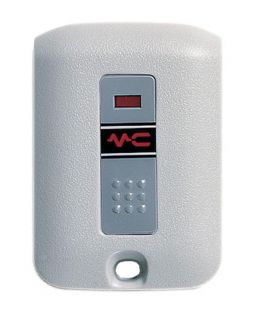
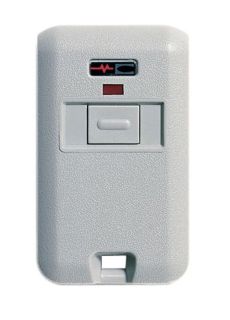
Linear / Multi-Code3089 / 3060 / 3070Visor / KeychainOriginal Units
Digi-CodeDC-5010 / DC-5040Visor / Mini3089 / 3060
LiftMaster300MC1-Button Visor3089 / MCS308911
Keystone HeddolfM219-1K / M220-1KKeychain / Visor3060 / 3089
Transmitter SolutionsStinger / Firefly 300MCDCompact Visor / KeychainAll 10-Switch 300MHz
SkyLinkSD-300 / 100AKeychain / Visor3089 / 3060
ChallengerMC1010 / MC1020 / MC4210Standard VisorMulti-Code Format
2. Compatible Wireless Keypads
BrandModelFrequencyCompatibility
Multi-Code4200 / 420001300 MHz10-Dip Switch Receivers
Digi-CodeDC-5200300 MHzMulti-Code 1090 / 1099
Transmitter SolutionsDOLKPW300300 MHzStandard Multi-Code
Chamberlain / LMKLIK2U / 387LMUniversalMust set to Multi-Code mode
3. Multi-Code Compatible Receivers
BrandModelPowerNotes
Multi-Code1090 / 1099 / 302812V-24V / 24V Plug-inIndustry standard
Digi-CodeDC-5100 / DC-511012V-24V / 24VDirect replacement for 1090
Transmitter SolutionsTransceiver 30012V-24VHigh sensitivity/range
Technical Tip: Universal Remotes

Models like the Chamberlain KLIK3U or LiftMaster 380UT can work with Multi-Code, but they do not have physical dip switches. You must use a "Step-and-Set" programming method to simulate the 10-switch code.